Order confirmation (Javascript)
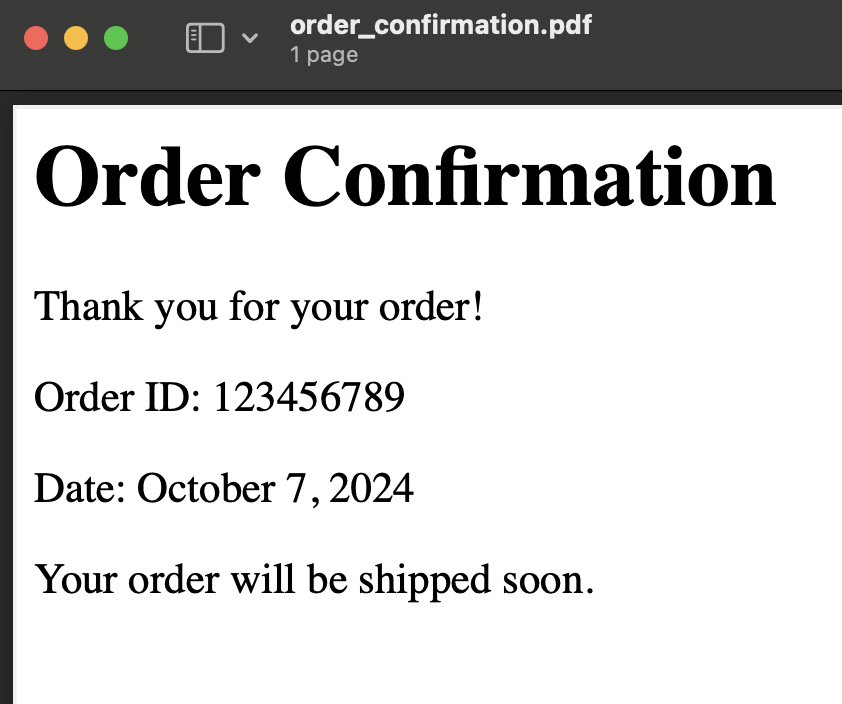
This example demonstrates how to generate a simple, static confirmation page in PDF format using the Raw engine. The report will be generated synchronously using the /generate-pdf-sync endpoint, and we’ll use Fetch API in JavaScript.
Step-by-Step Guide:
1. Prepare Your HTML
Here’s the simple HTML for an order confirmation page:
HTML (Raw):
<html>
  <head>
    <meta charset="UTF-8">
    <meta name="viewport" content="width=device-width, initial-scale=1.0">
    <title>Order Confirmation</title>
  </head>
  <body>
    <h1>Order Confirmation</h1>
    <p>Thank you for your order!</p>
    <p>Order ID: 123456789</p>
    <p>Date: October 7, 2024</p>
    <p>Your order will be shipped soon.</p>
  </body>
</html>
2. Submit the Template Using JavaScript with Node.js
We’ll use the Fetch API and the Node.js built-in fs module to generate and store the PDF.
JavaScript Code Example Using Fetch API:
const fetch = require('node-fetch');
const fs = require('fs');

// Define the HTML template (Raw HTML)
const htmlTemplate = `
<html>
  <head>
    <meta charset="UTF-8">
    <meta name="viewport" content="width=device-width, initial-scale=1.0">
    <title>Order Confirmation</title>
  </head>
  <body>
    <h1>Order Confirmation</h1>
    <p>Thank you for your order!</p>
    <p>Order ID: 123456789</p>
    <p>Date: October 7, 2024</p>
    <p>Your order will be shipped soon.</p>
  </body>
</html>`;

// Define the payload for the request
const requestData = {
  html_template: htmlTemplate,
  engine: 'raw', // Specify 'raw' engine since this is plain HTML without templating
};

// API Key
const apiKey = 'YOUR_API_KEY';

// Function to generate PDF using the Fetch API
async function generatePDF() {
  try {
    const response = await fetch('https://reportgen.io/api/v1/generate-pdf-sync', {
      method: 'POST',
      headers: {
        'X-API-Key': apiKey,
        'Content-Type': 'application/json',
      },
      body: JSON.stringify(requestData),
    });

    // Check if response is OK
    if (!response.ok) {
      throw new Error(`Error generating PDF: ${response.statusText}`);
    }

    // Get the response as a buffer (binary data)
    const pdfBuffer = await response.buffer();

    // Write the PDF to a file
    fs.writeFileSync('order_confirmation.pdf', pdfBuffer);
    console.log('PDF successfully generated and saved as order_confirmation.pdf');
  } catch (error) {
    console.error('Error generating PDF:', error.message);
  }
}

// Run the function to generate the PDF
generatePDF();
3. Explanation:
- HTMLTemplate: The HTML is static, simulating an order confirmation page.
- Fetch API: We use Fetch in Node.js to make the POST request.
- Buffer: The binary data (PDF) is stored in a buffer and written to a file using the
fsmodule.
4. Running the Script:
You can simply run this script with:
node script.js
5. Expected Output:
The script generates the PDF containing the order confirmation details and saves it as order_confirmation.pdf in your current directory.