Employee Report (Go)
This example demonstrates how to generate an employee report asynchronously using the Handlebars engine. The report will display a list of employees, their roles, and contact info. We’ll use Tailwind CSS for layout and FontAwesome for icons, and the API call will be made using Go.
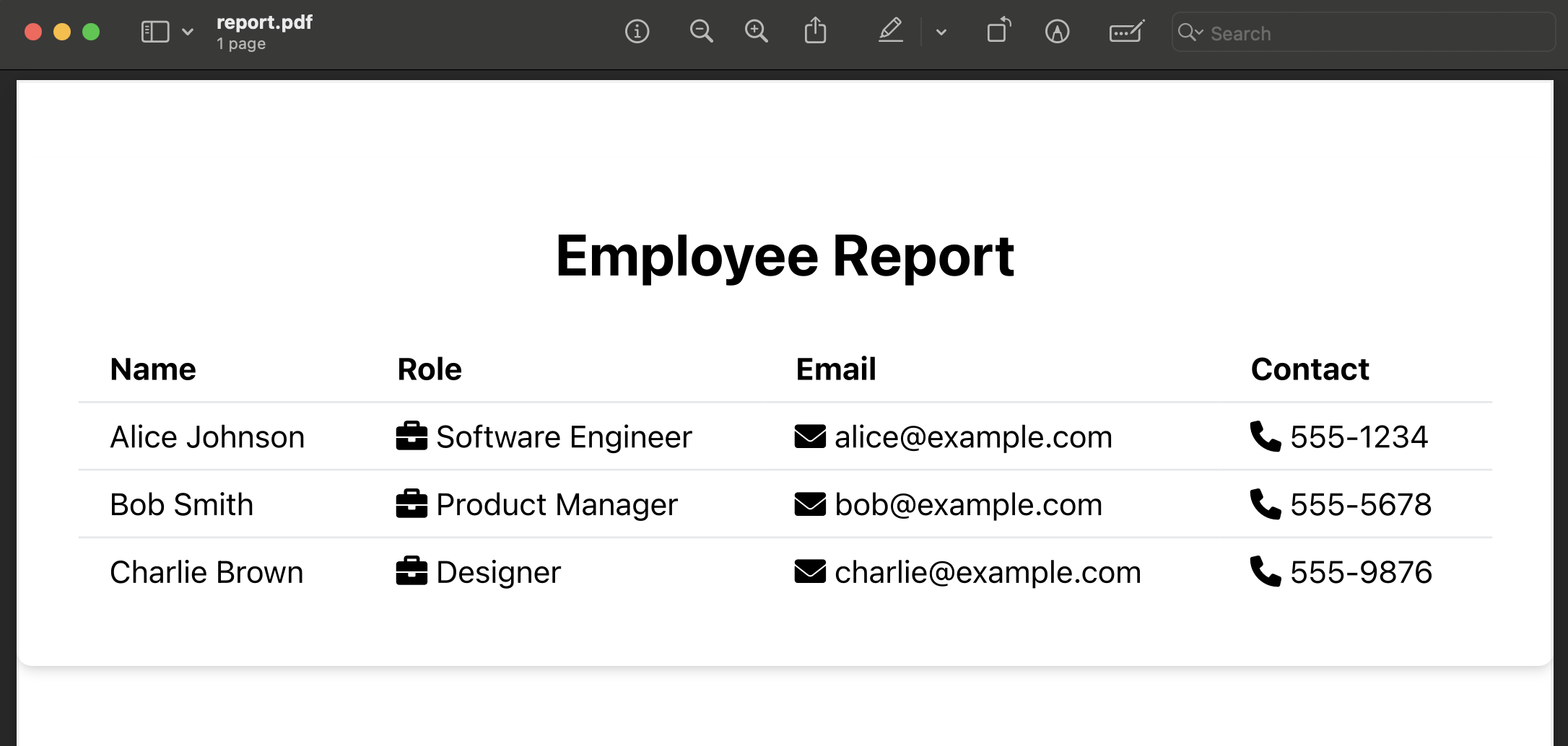
Step-by-Step Guide:
1. Prepare Your HTML Template
We’ll create a Handlebars-based HTML template to display employee details. Handlebars uses {{variable}} syntax for inserting dynamic data. We'll include Tailwind CSS for styling and FontAwesome for icons.
HTML Template (Handlebars):
<html>
  <head>
    <meta charset="UTF-8">
    <meta name="viewport" content="width=device-width, initial-scale=1.0">
    <script src="https://cdn.tailwindcss.com"></script>
    <link rel="stylesheet" href="https://cdnjs.cloudflare.com/ajax/libs/font-awesome/6.0.0-beta3/css/all.min.css">
    <title>Employee Report</title>
  </head>
  <body class="bg-gray-100">
    <div class="max-w-4xl mx-auto bg-white p-8 mt-10 rounded-lg shadow-md">
      <h1 class="text-3xl font-bold mb-6 text-center">Employee Report</h1>
      <table class="w-full text-left table-auto">
        <thead>
          <tr class="bg-gray-200">
            <th class="px-4 py-2">Name</th>
            <th class="px-4 py-2">Role</th>
            <th class="px-4 py-2">Email</th>
            <th class="px-4 py-2">Contact</th>
          </tr>
        </thead>
        <tbody>
          {{#each Employees}}
          <tr class="border-t">
            <td class="px-4 py-2">{{this.Name}}</td>
            <td class="px-4 py-2"><i class="fas fa-briefcase"></i> {{this.Role}}</td>
            <td class="px-4 py-2"><i class="fas fa-envelope"></i> {{this.Email}}</td>
            <td class="px-4 py-2"><i class="fas fa-phone"></i> {{this.Contact}}</td>
          </tr>
          {{/each}}
        </tbody>
      </table>
    </div>
  </body>
</html>
2. Submit the Template and Data Using Go
Now, we'll submit the HTML template and employee data using Go and include the X-API-Key header for authentication.
Go Code Example:
package main

import (
    "bytes"
    "encoding/json"
    "fmt"
    "io/ioutil"
    "net/http"
    "os"
)

type GeneratePDFRequest struct {
    HTMLTemplate string                 `json:"html_template"`
    Data         map[string]interface{} `json:"data"`
    Engine       string                 `json:"engine"`
}

func main() {
    // Define the HTML template
    htmlTemplate := `
    <html>
    <head>
      <meta charset="UTF-8">
      <meta name="viewport" content="width=device-width, initial-scale=1.0">
      <script src="https://cdn.tailwindcss.com"></script>
      <link rel="stylesheet" href="https://cdnjs.cloudflare.com/ajax/libs/font-awesome/6.0.0-beta3/css/all.min.css">
      <title>Employee Report</title>
    </head>
    <body class="bg-gray-100">
      <div class="max-w-4xl mx-auto bg-white p-8 mt-10 rounded-lg shadow-md">
        <h1 class="text-3xl font-bold mb-6 text-center">Employee Report</h1>
        <table class="w-full text-left table-auto">
          <thead>
            <tr class="bg-gray-200">
              <th class="px-4 py-2">Name</th>
              <th class="px-4 py-2">Role</th>
              <th class="px-4 py-2">Email</th>
              <th class="px-4 py-2">Contact</th>
            </tr>
          </thead>
          <tbody>
            {{#each Employees}}
            <tr class="border-t">
              <td class="px-4 py-2">{{this.Name}}</td>
              <td class="px-4 py-2"><i class="fas fa-briefcase"></i> {{this.Role}}</td>
              <td class="px-4 py-2"><i class="fas fa-envelope"></i> {{this.Email}}</td>
              <td class="px-4 py-2"><i class="fas fa-phone"></i> {{this.Contact}}</td>
            </tr>
            {{/each}}
          </tbody>
        </table>
      </div>
    </body>
    </html>`

    // Define the employee data
    data := map[string]interface{}{
        "Employees": []map[string]interface{}{
            {"Name": "Alice Johnson", "Role": "Software Engineer", "Email": "[email protected]", "Contact": "555-1234"},
            {"Name": "Bob Smith", "Role": "Product Manager", "Email": "[email protected]", "Contact": "555-5678"},
            {"Name": "Charlie Brown", "Role": "Designer", "Email": "[email protected]", "Contact": "555-9876"},
        },
    }

    // Create the request payload
    requestPayload := GeneratePDFRequest{
        HTMLTemplate: htmlTemplate,
        Data:         data,
        Engine:       "handlebars",
    }

    // Marshal the payload to JSON
    payload, err := json.Marshal(requestPayload)
    if err != nil {
        fmt.Println("Error marshaling request:", err)
        os.Exit(1)
    }

    // Create the request
    req, err := http.NewRequest("POST", "https://reportgen.io/api/v1/generate-pdf-async", bytes.NewBuffer(payload))
    if err != nil {
        fmt.Println("Error creating request:", err)
        os.Exit(1)
    }

    // Set headers, including the API key
    req.Header.Set("Content-Type", "application/json")
    req.Header.Set("X-API-Key", "YOUR_API_KEY")

    // Make the request
    client := &http.Client{}
    resp, err := client.Do(req)
    if err != nil {
        fmt.Println("Error making request:", err)
        os.Exit(1)
    }
    defer resp.Body.Close()

    body, err := ioutil.ReadAll(resp.Body)
    if err != nil {
        fmt.Println("Error reading response:", err)
        os.Exit(1)
    }

    // Output the response
    fmt.Println("Response:", string(body))
}
3. Explanation:
- HTMLTemplate: The HTML template is styled with Tailwind CSS and uses FontAwesome for icons.
- Data: The employee data is passed as a map of employee details.
- Engine: The
"handlebars"engine is specified for templating.
4. Expected Response:
Since this is an asynchronous request, the response will return a report_id that you can later use to retrieve the PDF once it's generated.
{
  "report_id": "123e4567-e89b-12d3-a456-426614174000"
}
5. Retrieve the PDF
Once the PDF is generated, you can use the report_id to retrieve the PDF file by sending a GET request to the /reports/{reportID}/download endpoint.